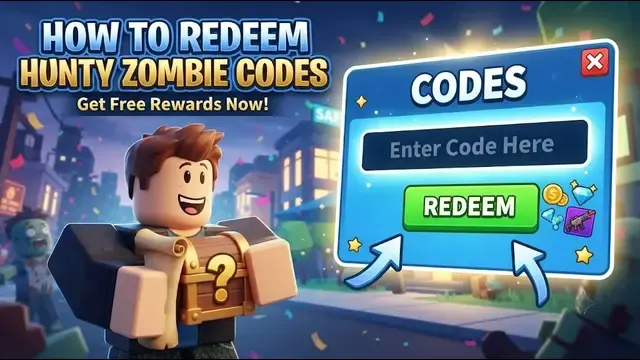
If you’re new to the Hunty Zombie game, you dont need to worry about codes; this guide explains how you can find game codes and redeem them easily. Codes give you free rewards, including spins, perks, traits, and many useful resources. That helps users to upgrade their character, skills and gameplay.
What You Need Before Redeeming a Code
Before redeeming a game code, you have to reach the minimum required level 5. If you are below the required level, you should need to focus on gaming and leveling up. Once the basic requirements are met, you can open the code menu and enter an active code.
You need to validate the code before redeeming it. Check Active Hunty Zombie Codes in the main guide, where you can find active codes for the Hunty Zombie game. Copy the exact code as it is shown and keep letters, numbers, and symbols unchanged.
Where to Find the Code Menu
After reaching the minimum requirement of level 5, you can access the Hunty Zombie Code redemption area from the game interface. Look for the open book icon in the game interface; it opens the menu where you can enter a code.
Find the Open Book Item
Look for the open book icon in the game platform that contains the code redemption option.
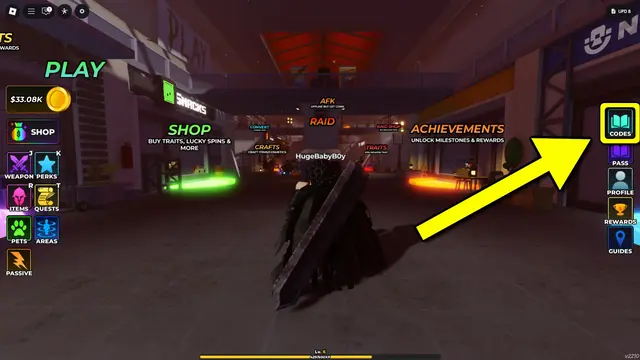
From the above image, you can identify the current icon instead of searching through different icons.
How to Redeem Hunty Zombie Codes
Follow these steps that help you to redeem Hunty Zombie codes:
Open Hunty Zombie
Open the Hunty Zombie Game in Roblox and enter a game server. Once you are in the game, then you can begin the redemption process from the main interface.
Open the Code Menu
Open the open book icon on the game platform; you can see it in the right-side column of the game’s main lobby. Click that icon and open the code menu.
Enter the Code
After opening the code menu from the game, you can see the “Enter Code Here” field. Type your Huntyzombie code in this field, or if you copied the code from our guide, you just need to paste the code into this game.
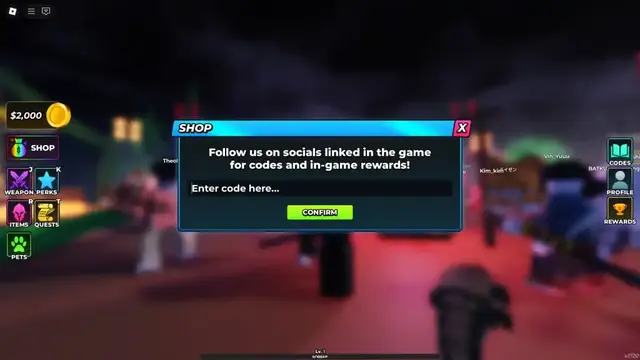
Make sure you enter the code exactly as provided, including its capital letters, numbers, and symbols.
After entering the code, select the Confirm button. If your code is correct, this game will give you rewards and items that are associated with the game code.
How to Redeem Hunty Zombie Codes
You need to follow the steps to claim your free rewards using Hunty Zombie codes.
Step 1: Open the Hunty Zombie Game
Launch the Hunty Zombie Game in Roblox.
Step 2: Check Your Level
Check whether or not you reached the minimum required level of 5.
Step 3: Open Code Menu
Click the open book icon to open the code menu.
Step 4: Enter the Code
Use the “Enter Code Here” field and enter the active Hunty Zombie code.
Step 5: Select Confirm
Select to confirm and submit the code.
Step 6: Check Your Reward
After submitting your code, if your code is correct, the rewards associated with the code are added to your account so you can use them in the game.
How to Copy and Paste a Hunty Zombie Code
Copying and pasting the entire code helps the redemption process quickly and effectively; you can enter the code accurately.
Copy the Full Code
Find Active Hunty Zombie Codes from our guide and copy the entire code, including all letters, numbers, and symbols. Make sure you do not leave any character, symbol, or number when you copy the code.
Paste the code without changing it
After copying the entire code, you can paste the entire code exactly as it is without changing it in the “Enter Code Here” field.
Enter the Code Exactly as Shown
When you enter code in the Hunty Zombie game, enter the code exactly as it is provided, including all the letters, numbers, and symbols.
Check Capitalization
Roblox game codes are case-sensitive, so keep uppercase and lowercase letters exactly as it is we provide in our guide.
Keep Numbers and Symbols
Do not remove or change any numbers or symbols in the game; keep numbers and symbols as they are.
Avoid Extra Spaces
Make sure there are no accidental spaces before or after the code when you enter the code. Keep the code in the same format as we provide in our guide.
What happens after you redeem a code
After entering the code into the game, it checks whether your code is correct. If your code is correct, the game adds rewards to your account.
You can then use the received rewards in your game according to their purpose; this completes the redemption process.
Where to Find Current Hunty Zombie Codes
If you want to claim free rewards in the Hunty Zombie game and you dont have codes to redeem them, then you can find Hunty Zombie Codes in our main code guide. The guide keeps the available codes together in one place, making it easier to find available codes.
Our main code guide includes the current Hunty Zombie codes along with the rewards available from each one. You just need to copy an active code from our guide and enter it into the Hunty Zombie game.
Quick Redemption Checklist
- Reach Level 5
- Open the game
- Find the open-book icon
- Open the code section
- Enter the code
- Check capitalization
- Keep symbols intact
- Select Confirm
- Check the reward
FAQ
Q. What level do I need to redeem Hunty Zombie codes?
You need to reach the maximum required level 5 to redeem Hunty Zombie codes.
Q. Where do I enter my Hunty Zombie codes?
Open the code menu by selecting the open book icon, then enter the code in the “Enter Code Here” field.
Q. Do I need Robux to redeem codes in the Hunty Zombie game?
No, you dont need to use Robux to claim codes in the Hunty Zombie game. Codes are listed to give rewards for free without any purchase.
Q. Can you use code rewards immediately?
Once your code has been successfully redeemed and its rewards has been aded to your account, so you can use game rewards thoughts relevant game system.